
Sales order processing in Jiwa creates General Ledger journal entries as part of the sales cycle. These journals include entries for sales, GST, debtors, inventory, cost of goods sold, and other related accounts depending on the transaction being processed.
This article explains the journal entries created during the sales cycle and how these entries can differ depending on the billing type used and the way the Jiwa database has been configured.
The examples in this article are based on specific system settings. Your own journal entries may differ if your Jiwa database uses different ledger, invoicing, branch, or non-physical item settings.
Example settings used in this article
The journal examples in this article are based on the following Jiwa system settings. Your own journal entries may differ if your Jiwa database uses different ledger, invoicing, branch, or non-physical item settings.
|
Setting |
Value used in this article |
What this means |
|---|---|---|
|
Use Inventory Sales Ledger Invoicing |
Yes |
The sales account applied to invoice lines is taken from the Sales control account in Inventory Maintenance > Other > Ledgers. |
|
Post Non Physical To COGS Invoicing |
No |
Cost of sales is not posted for non-physical items. Sales reports may still include this cost in COGS(2). |
|
Branch Invoicing Invoice |
No |
The Sales Division field is hidden on the Sales Order Entry form. |
|
Branch SegNo Ledger |
Only applicable if Branch Invoicing is enabled |
This setting only applies when Branch Invoicing has been enabled. |
Physical Items
Ship & Bill Sales Orders
Ship and Bill Sales Orders are orders where the sale and cost of sale are posted to the General Ledger with each delivery of the sales order.

General Ledger Journals Created
|
Snapshot 1 - Delivered Stock |
||
|
DR / CR |
Account |
Description |
|
DR |
Cost of Sales |
Value of stock delivered in snapshot 1 |
|
CR |
Inventory Value |
Value of stock delivered in snapshot 1 |
|
DR |
Debtors Control |
Sale value including GST for snapshot 1 |
|
CR |
Sales |
Sale value excluding GST for snapshot 1 |
|
CR |
GST Supplies |
GST on sale for snapshot 1 |
|
Snapshot 2 - Delivered Stock |
||
|---|---|---|
|
DR / CR |
Account |
Description |
|
DR |
Cost of Sales |
Value of stock delivered in snapshot 2 |
|
CR |
Inventory Value |
Value of stock delivered in snapshot 2 |
|
DR |
Debtors Control |
Sale value including GST for snapshot 2 |
|
CR |
Sales |
Sale value excluding GST for snapshot 2 |
|
CR |
GST Supplies |
GST on sale for snapshot 2 |
Note
The journal entries shown are examples based on the system settings described in this article. Your journal entries may differ if your Jiwa database uses different ledger, invoicing, branch, GST, or non-physical item settings.
To demonstrate this the following sales order will be processed
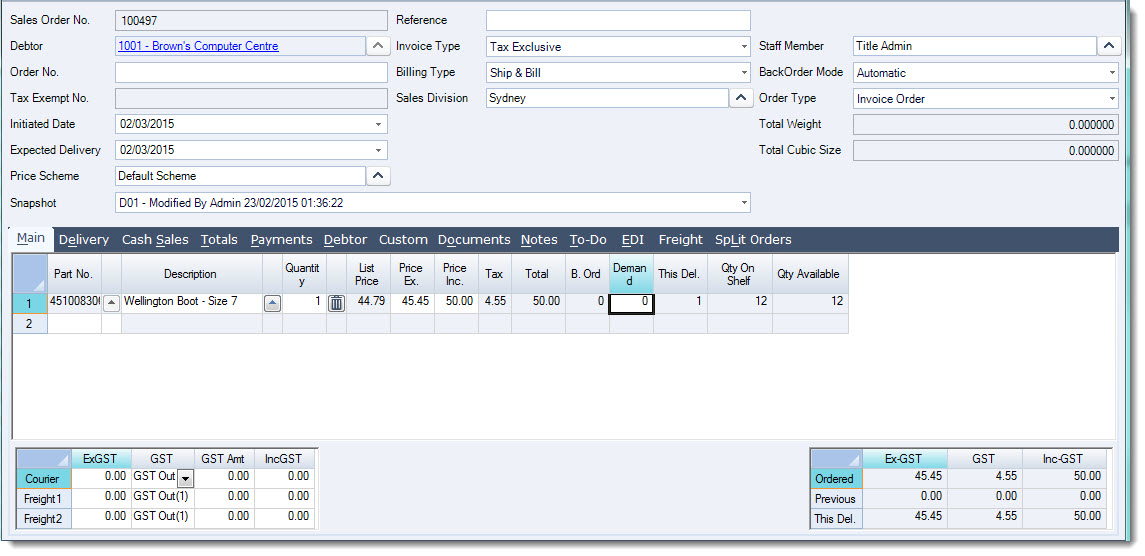
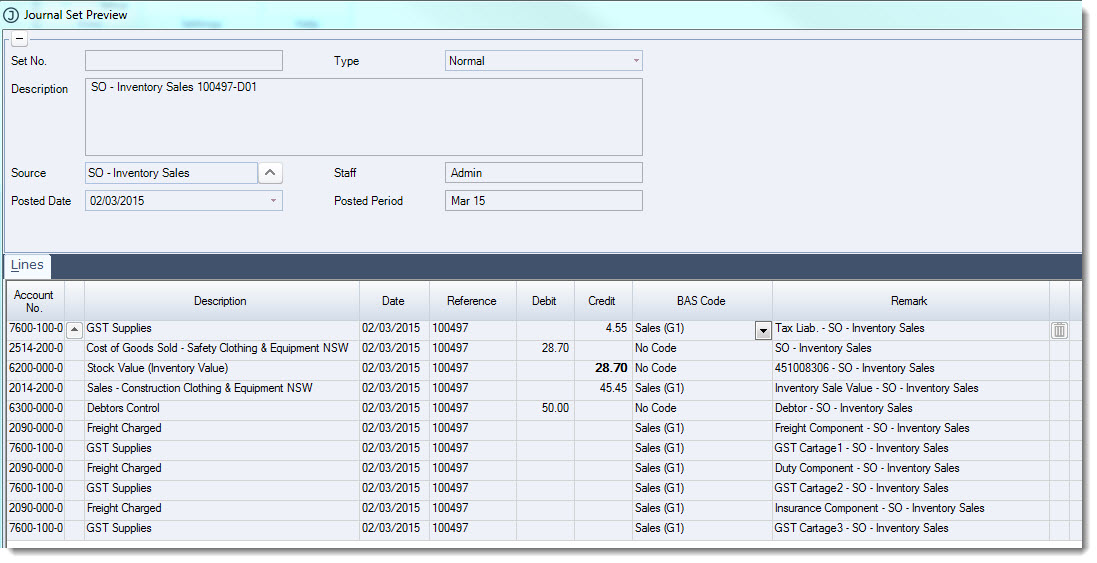
With each snapshot the following journal entry is created taking up the sale and cost of sale.
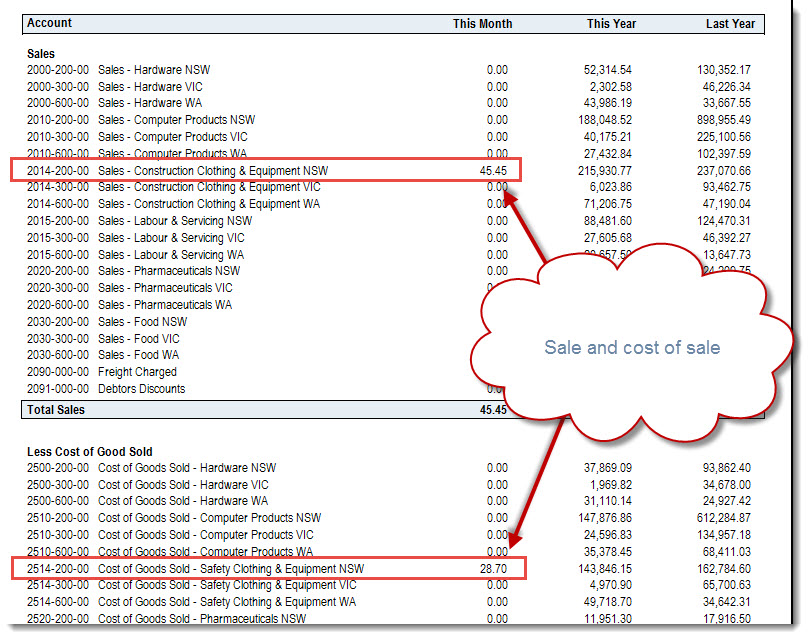
Income and cost of sales appears on the Profit & Loss report.
Bill Complete Sales Orders
Bill Complete Sales Orders are orders where part deliveries are made however the sale and cost of sale are not posted to the General Ledger until the order has been delivered in full and the invoice issued for the total delivered.

General Ledger Journals Created
|
Snapshot 1 - Delivered Stock |
||
|
DR / CR |
Account |
Description |
|
DR |
Stock Assigned Value |
Value of stock delivered in snapshot 1 |
|
CR |
Inventory Value |
Value of stock delivered in snapshot 1 |
|
Snapshot 2 - Delivered Stock Order Complete |
||
|---|---|---|
|
DR / CR |
Account |
Description |
|
DR |
Cost of Sales |
Value of stock delivered in snapshot 1 |
|
CR |
Stock Assigned Value |
Transfer value of stock delivered on snapshot 1 |
|
DR |
Cost of Sales |
Value of stock delivered in snapshot 2 |
|
CR |
Inventory Value |
Value of stock delivered in snapshot 2 |
|
DR |
Debtors Control |
Total Sale value including GST |
|
CR |
Sales |
Total Sale value excluding GST |
|
CR |
GST Supplies |
Total GST on sale |
In this example we have an order that can only be part delivered on the first snapshot.
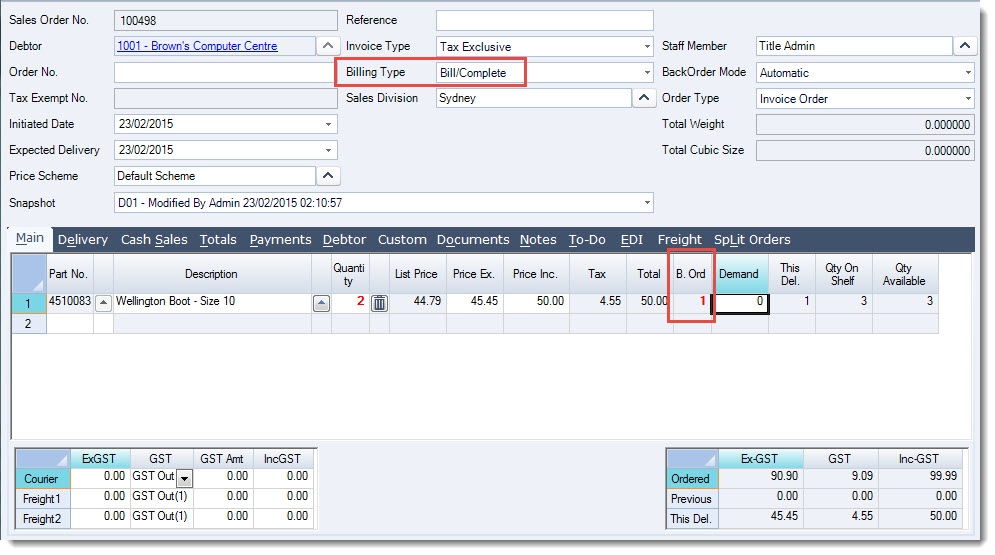
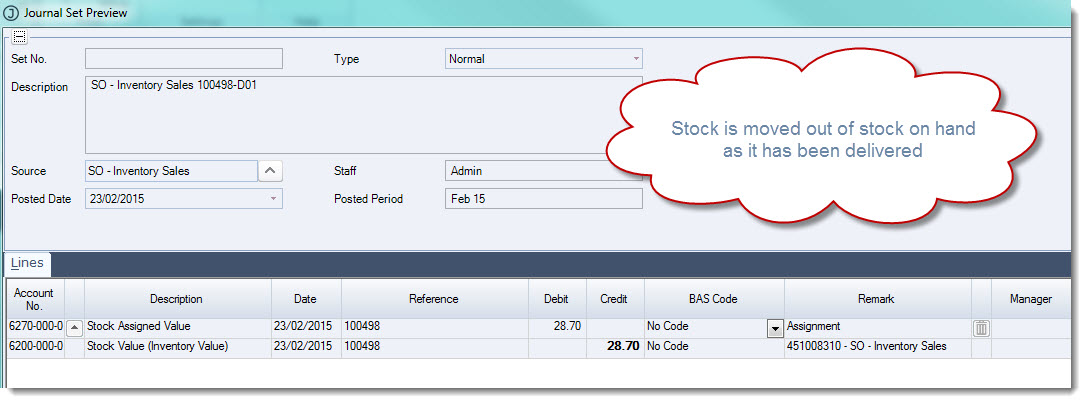
The following journal entry is created on the first delivery.
The value of stock delivered is transferred from the Inventory Control account to the Stock Assigned Value account, indicating that stock has been supplied but has yet to be invoiced.
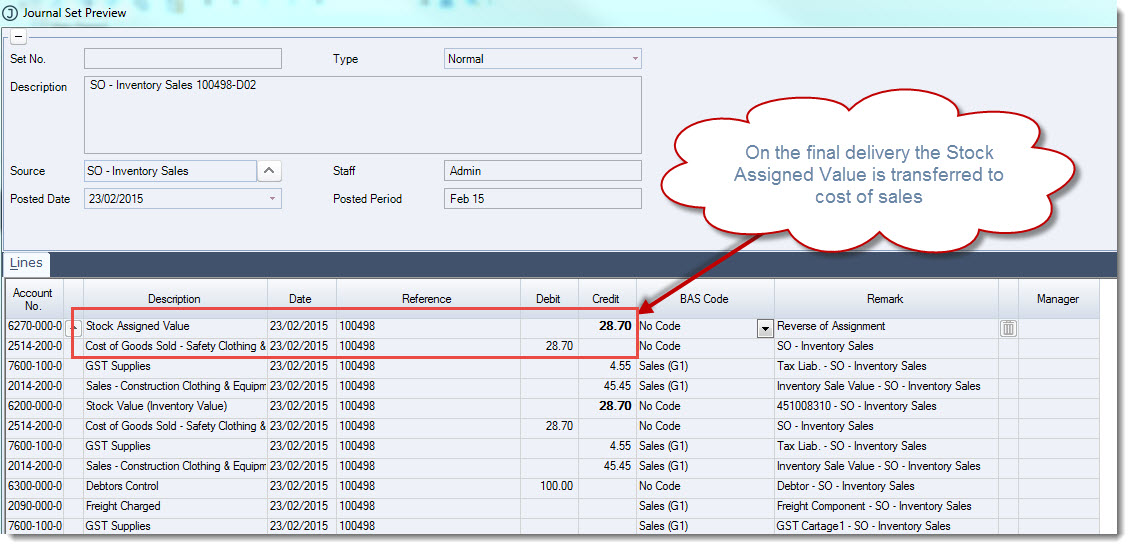
On the last delivery (snapshot) the following journal entry is created.
As this is the final delivery on this order and the order is now closed the sale and cost of sale is taken up in the General Ledger.
Ship Complete Sales Orders
Ship Complete Sales Orders are orders where stock is not delivered to the customer until the order can be delivered in full.
Only when the full order is delivered is the sale and cost of sale taken up in the General Ledger.
General Ledger Journals Created
|
Snapshot 1 - Delivered Stock |
||
|
DR / CR |
Account |
Description |
|
DR |
Ship on Completion |
Value of stock processed in snapshot 1 |
|
CR |
Inventory Value |
Value of stock processed in snapshot 1 |
|
Snapshot 2 - Delivered Stock Order Complete |
||
|---|---|---|
|
DR / CR |
Account |
Description |
|
DR |
Inventory Control |
Reverse value of stock processed in snapshot 1 |
|
CR |
Ship on Completion |
Reverse value of stock processed on snapshot 1 |
|
DR |
Cost of Sales |
Total order cost of sales value |
|
CR |
Inventory Value |
Total order cost of sales value |
|
DR |
Debtors Control |
Total Sale value including GST |
|
CR |
Sales |
Total Sale value excluding GST |
|
CR |
GST Supplies |
Total GST on sale |
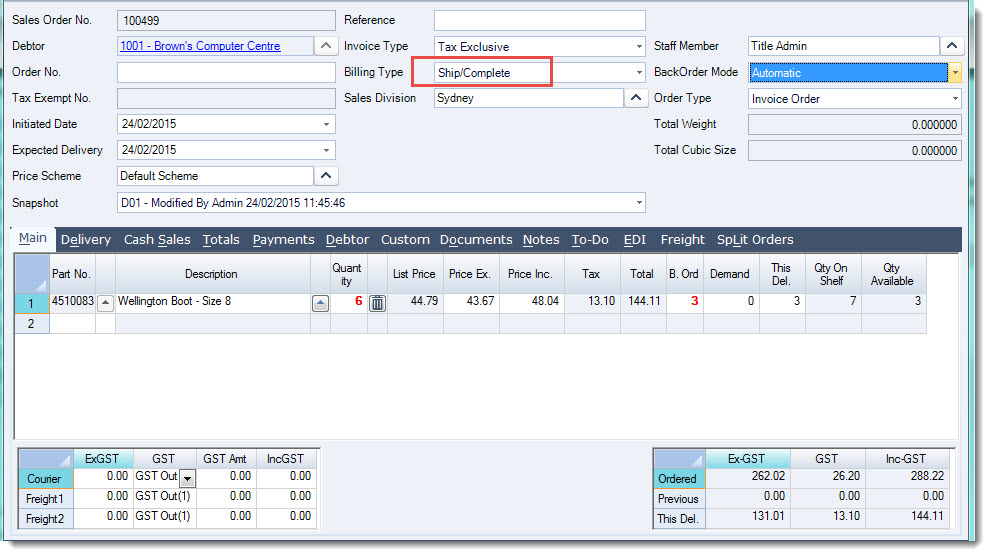
In this example we have an order that can only be part delivered on the first snapshot, the stock is not delivered but is set aside for the customer until the full order can be shipped.
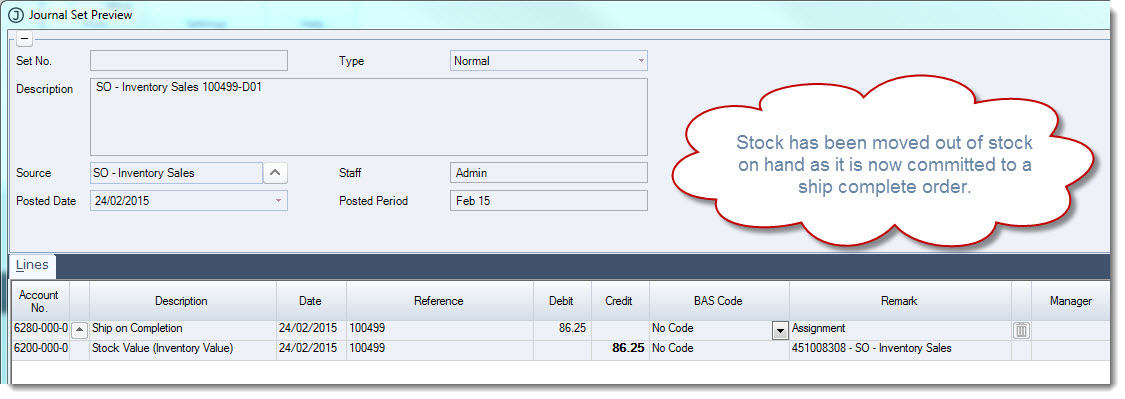
When the snapshot is processed the following journal is created.
The value of stock allocated to the order is transferred from the Inventory Control account to the Ship on Completion account, indicating that stock has been allocated to a Ship Complete order that cannot be delivered.
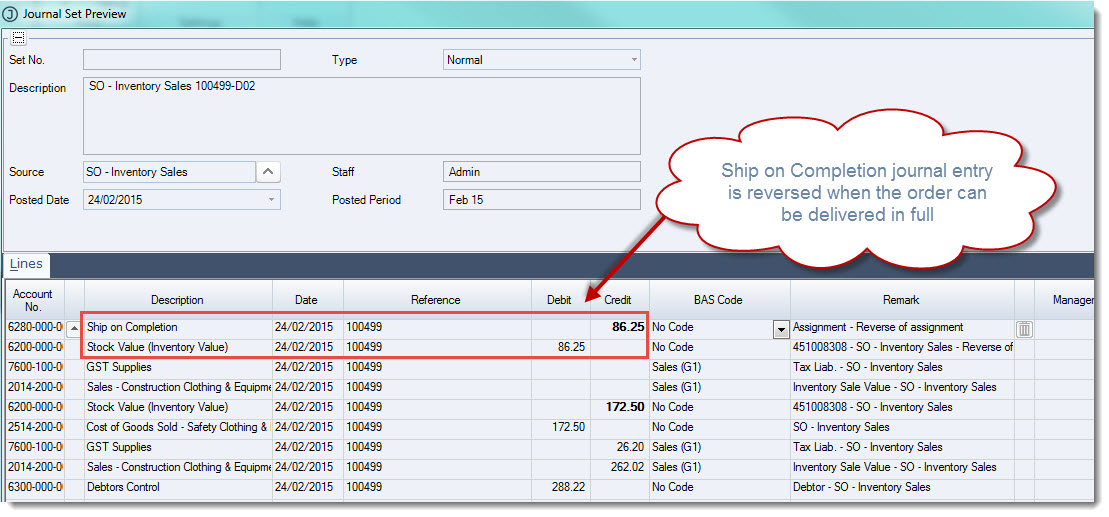
This journal entry is reversed with each processed snapshot.
When the order can be delivered in full on the last processed snapshot the following journal entry is created. Because the order can be delivered in full the sale and cost of sale is taken up in the General Ledger.
Non Physical Items
The posting of sales to the General Ledger for non physical items is the same as that of physical items detailed above however the posting of cost of sales is dependant upon the set-up of your Jiwa database.
Non Physical items generally do not post cost of sales unless the Post Non Physical To COGS Invoicing system setting is enabled. When this setting is enabled costs are posted to the General Ledger as per the postings for physical items detailed above.
The Post Non Physical to COGS setting is typically only enabled when cost recoveries need to be posted to the General Ledger such as Labour costs. An estimated cost of the item is posted to the General Ledger using the last cost from the inventory maintenance form. The cost of sales account on these items is typically set to a cost recovery account.
For further details on non physical items and cost recovery please contact your Jiwa Consultant.
Non Inventory Items
Non inventory items do not have an inventory maintenance record and are typically used for one off items or special purchase items that you want to sell but not create an inventory record for.
The posting of sales to the General Ledger for these items is the same as that of physical items detailed however non inventory items do not post any cost of sales.