
The Pantry List is a Jiwa plugin that provides a quick way to review a customer’s recent sales history and enter order quantities during the sales order process.
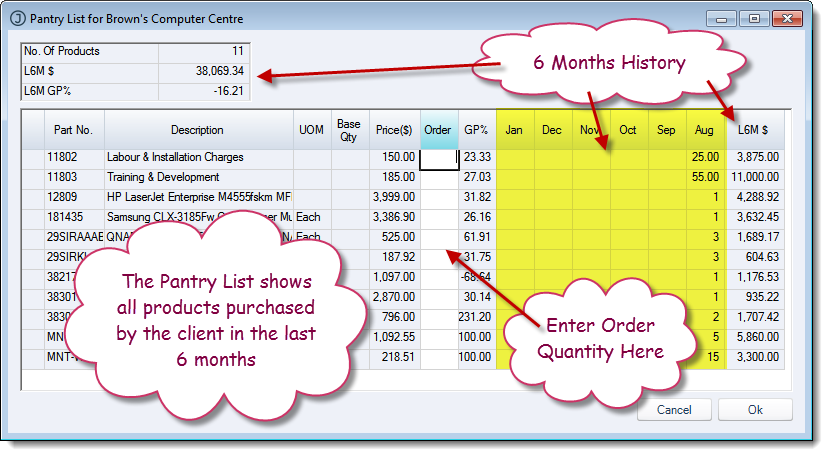
It displays the customer’s quantity sales history over the past six months by month, based on the system date, along with the customer’s last price paid and an overview of gross profit. Users can enter quantities directly into the Pantry List grid, and those quantities are then added to the sales order.
This article explains how to use the Pantry List to review customer buying patterns, pricing, and margin information, while also using it as a quick data entry grid for sales order lines.
Need access to the Pantry List?
The Pantry List is a standard Jiwa plugin that can be enabled if required.
If the Pantry List is not available in your Jiwa environment, please contact Opal Logic on 1300 456 725 or email our support desk at support@opallogic.com.au for assistance.
Using the pantry list
When you create a new Order / Invoice the system will ask you if you want to create the order from a pantry list.
If you answer No then it is the same old order entry process where you look for and enter in each item the client wants to purchase line by line.
If you answer Yes then another screen opens up with the history of products that the client has purchased in the last six months.

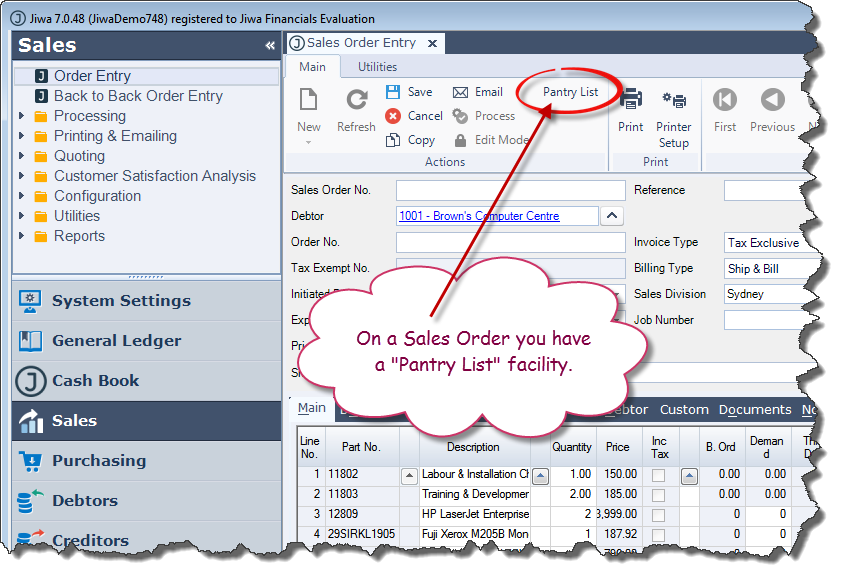
Even if you answer No you can still get the Pantry List via a button on the top of the order.
Notice you are able to see all the products purchased in the last 6 months (month by month), their individual profitability and the profitability of that client for the last six months.
The pricing that is listed relates to that client's pricing for the "Order Date". So if the client has specific pricing then the pantry list will reflect that.
You can now enter in the quantity required of each product and when you are ready press OK.
Your order will automatically be populated with the lines you selected.
Video walkthrough