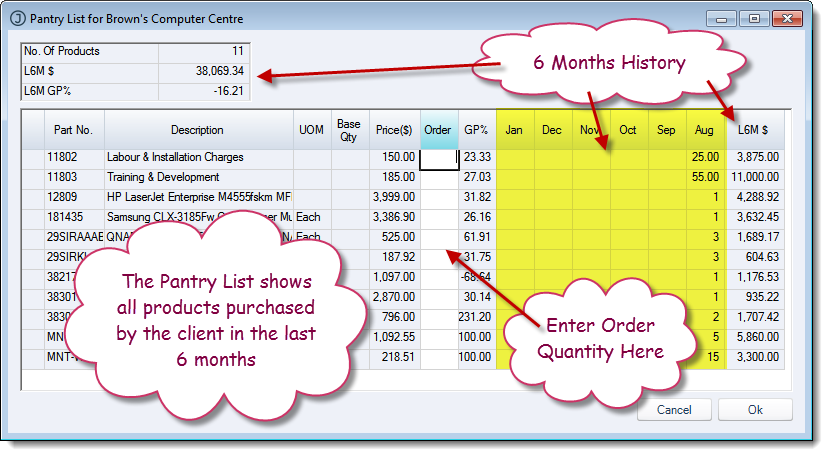
The Pantry List is a new feature in Jiwa 7 which helps you know what your clients have purchased from you in the past.
When you create a new Order / Invoice the system will ask you if you want to create the order from a pantry list.
If you answer No then it is the same old order entry process where you look for and enter in each item the client wants to purchase line by line.
If you answer Yes then another screen opens up with the history of products that the client has purchased in the last six months.

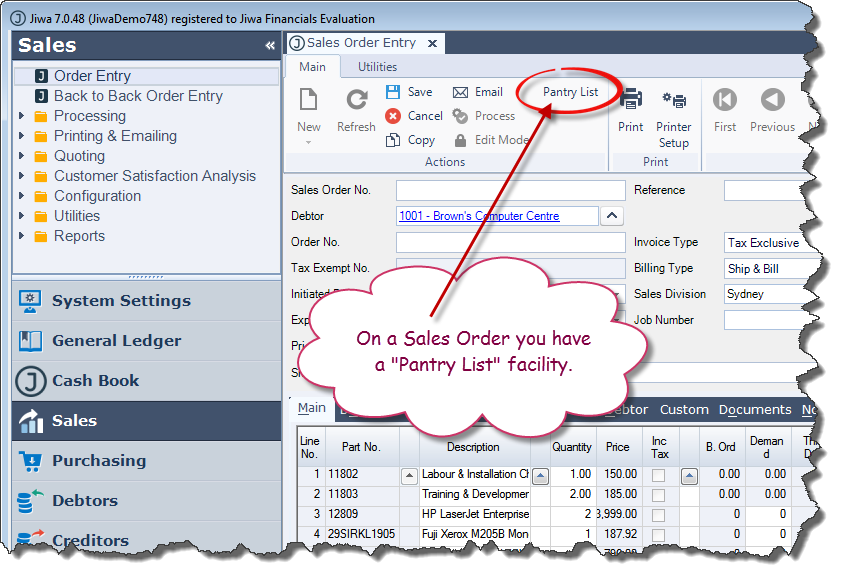
Even if you answer No you can still get the Pantry List via a button on the top of the order.
Notice you are able to see all the products purchased in the last 6 months (month by month), their individual profitability and the profitability of that client for the last six months.
The pricing that is listed relates to that client's pricing for the "Order Date". So if the client has specific pricing then the pantry list will reflect that.
You can now enter in the quantity required of each product and when you are ready press OK.
Your order will automatically be populated with the lines you selected.