The stock keeping unit in Jiwa defines how items are bought, sold, stocked and counted.
Units of measure allow you to purchase and/ or sell items in different quantities such as cartons, box or pallet.
In this article we take a look at how to create different units of measure.
Inventory Maintenance
When creating your new inventory item the unit of measure is set on the Unit of Measure (UoM) tab.
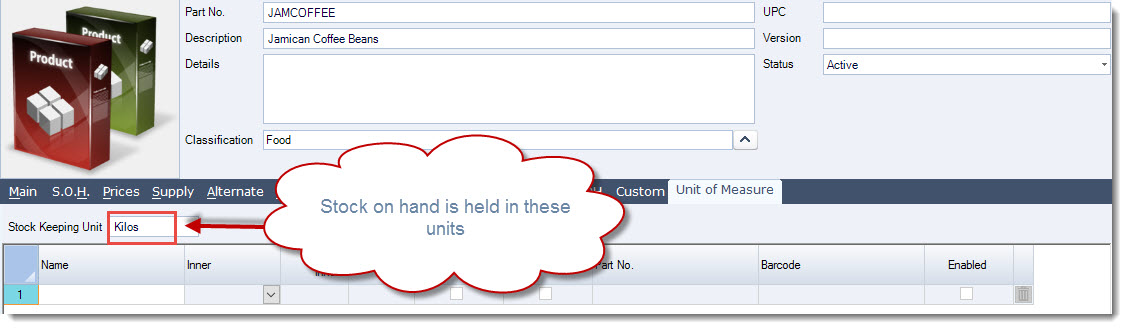
The Stock Keeping Unit represents the units in which stock levels are held in Jiwa.
Adding Units of Measure
All UoM's are based on the stock keeping unit, so it is important that the decimal places are set correctly if you intend to sell in quantities that are smaller than your stock keeping unit as in the example below.
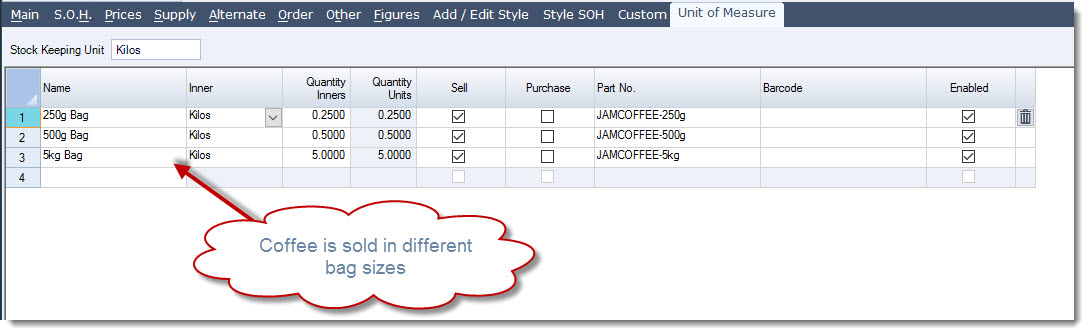
Start adding your new UoM's to the grid by first entering a description in the Name field.
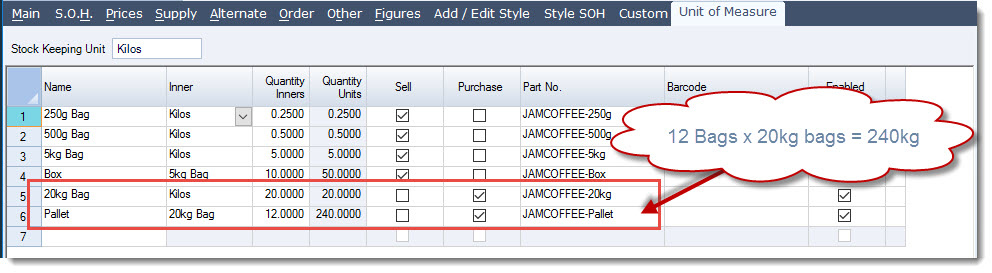
In the following example we sell our coffee in 250g, 500g and 5kg bags.
The units inner quantity measure, kilos in this example is entered in the Quantity Inners field for the UoM
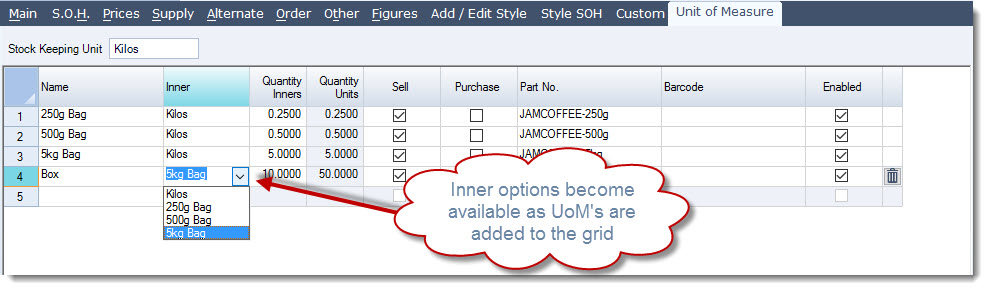
In the next example we also sell our coffee in boxes containing 10 x 5kg bags.
Notice that we now have set our inner quantity to 10 units of 5kg Bags which calculates a total Quantity Units of 50kg (10 x 5kg).
As UoM's are added to the inventory item when saved they become available for use as inner quantities.
In the next example we purchase our coffee in 20kg bags and in pallets of 12 x 20kg bags.
|
Field |
Description |
|
Name |
Unit of measure name |
|
Inner |
Select the applicable inner units |
|
Quantity Inner |
This is the number of inner units contained in your UoM. |
|
Quantity Units |
This is a calculated field representing the total quantity in the items stock keeping units Inner * Quantity Inner = Quantity Units |
|
Sell |
Select this option if you sell in this UoM |
|
Purchase |
Select this option if you purchase in this UoM |
|
Part No. |
Enter in the part number for the UoM This field is then available in inventory searches when using the search option UOM Part Number The field can also be used in custom reports such as purchase orders and invoices |
|
Barcode |
Enter in the barcode for the UoM This field is then available in inventory searches when using the search option UOM Barcode The field can also be used in custom reports such as purchase orders and invoices |
|
Enabled |
When creating a new UoM the enabled check box is automatically checked Un-check if you need to disable the UoM |
Quantity Price Breaks
Pricing by UoM will be introduced in a subsequent release of Jiwa. In this initial release sell prices and purchase prices are maintained through quantity price breaks.
Purchase Prices
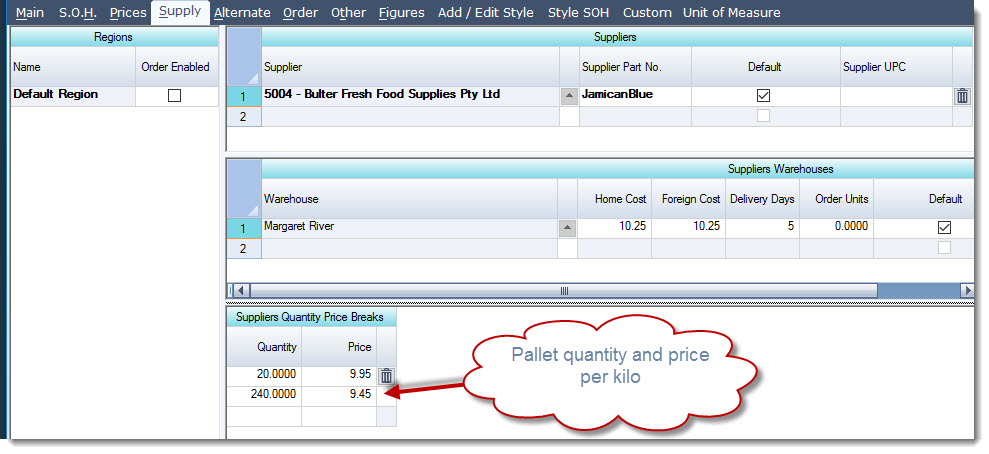
To set your purchasing quantity breaks move to the Supply tab in Inventory Maintenance.
In the section Suppliers Quantity Price Breaks set your purchase price quantity breaks.
Note: The price break quantity is based on the stock keeping unit.
Selling Prices
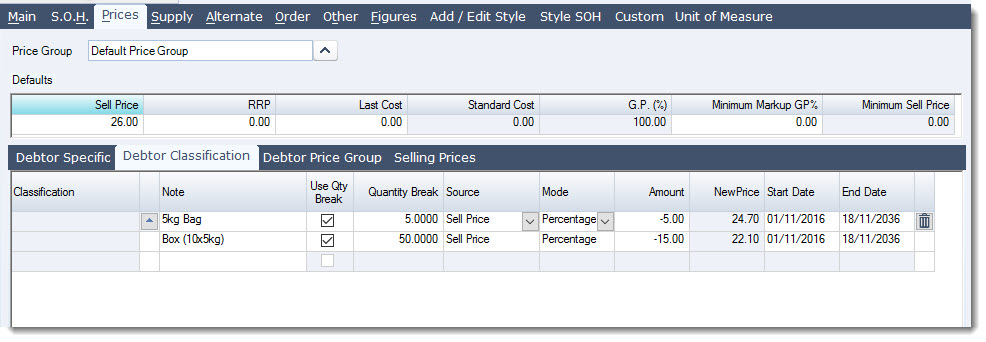
To set your selling prices move to the Prices | Debtor Classification tab in Inventory Maintenance.
As the selling prices by UoM are applicable to all customers we are going to setup our prices under Debtor Classification using quantity breaks as per the example below.
Price breaks in this example have not been setup for quantities that are less than a kilo because the price is not discounted when sold in smaller quantities.
The Classification field is left blank as the price is applicable to all customers.
Note: The price break quantity is based on the stock keeping unit.
Purchasing in UoM's
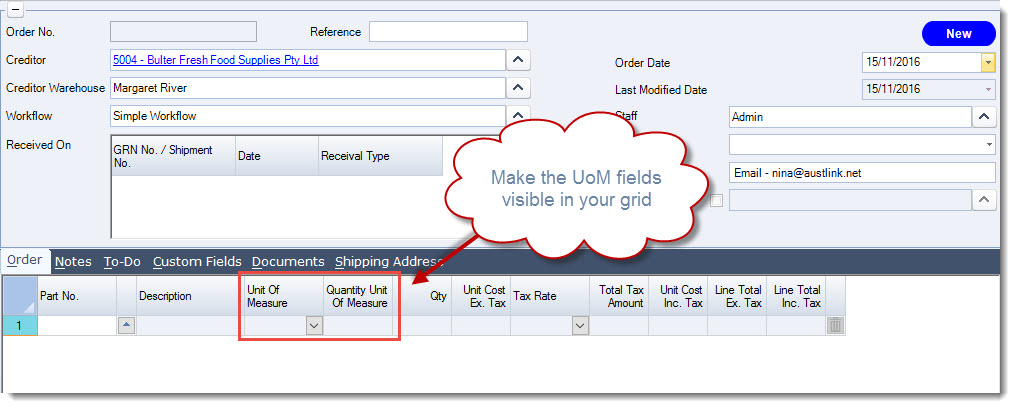
Before you can purchase in different units of measure you need to make the following fields visible in your grid as they are invisible by default.
-
Unit of Measure, and
-
Quantity Unit of Measure
Start adding your items to the purchase order.
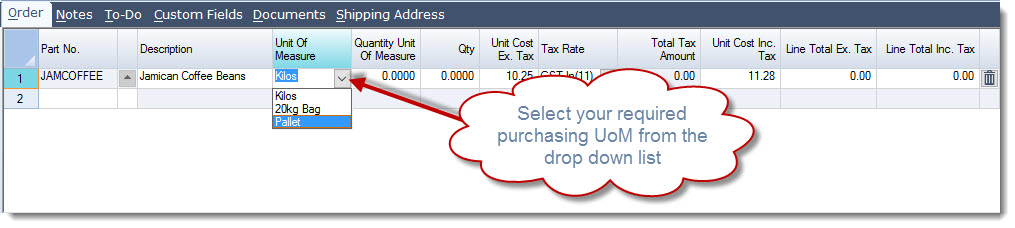
To select the purchasing UoM click on the arrow next to the Unit of Measure field.
You will notice that only UoM's flagged for purchasing are available for selection in addition to the stock keeping unit.
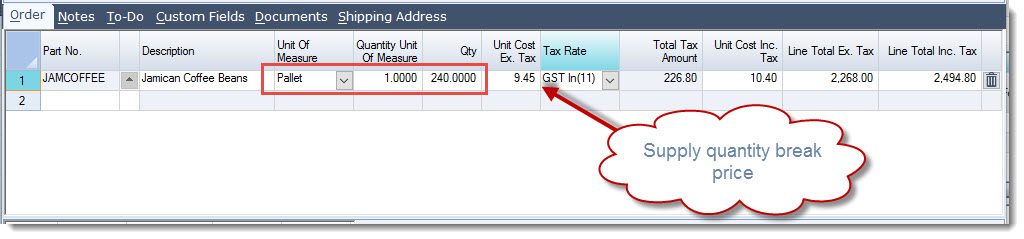
In the Quantity Unit of Measure field enter in the quantity required.
In the example below we are ordering 1 pallet of coffee which equates to 240kg's.
The correct kilo price is applied as per the supply quantity break that has been setup.
Process your purchase order as normal
Note: Contact your Jiwa Consultant if you need your purchase order report to display the required UoM.
Selling in UoM's
When selling in different UoM's make sure that you have made visible the UoM fields on the Main tab.
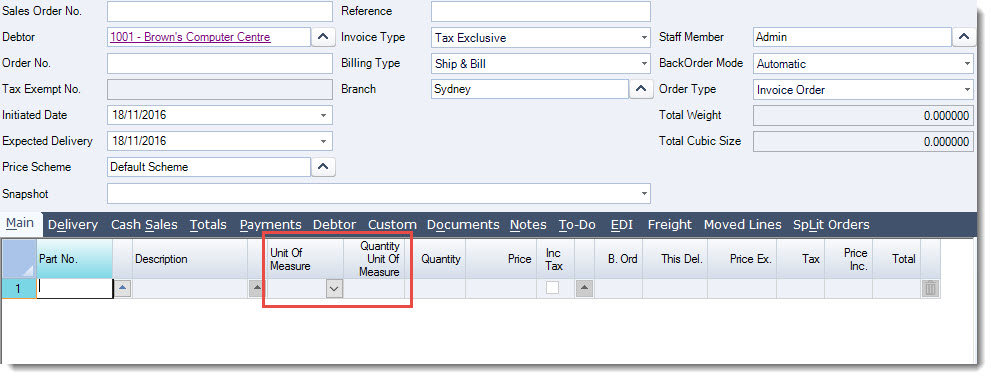
Start adding your items to the sales order.
To select the selling UoM click on the arrow next to the Unit of Measure field.
You will notice that only UoM's flagged for sale are available for selection in addition to the stock keeping unit.
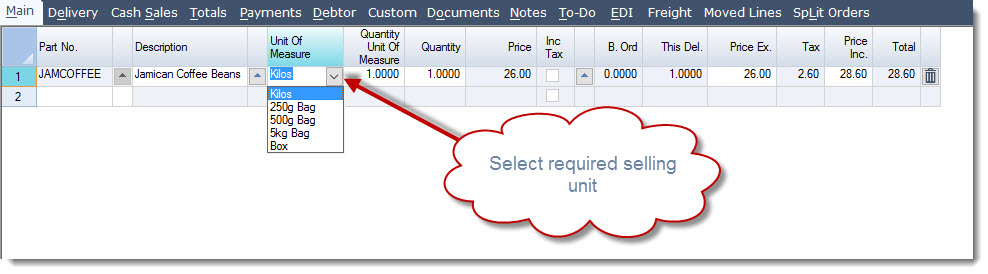
In the Quantity Unit of Measure field enter in the quantity required.
In the example below we are selling 1 of each UoM to demonstrate how pricing is applied.
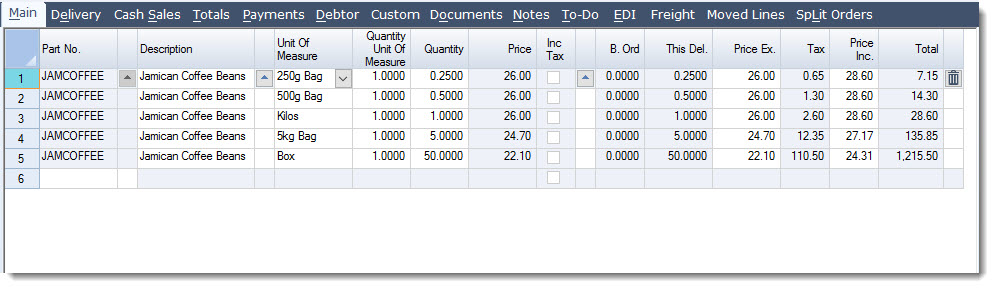
Process your sales order as normal.
Note: Contact your Jiwa Consultant if you need your invoice or other sales order reports to display the required UoM.
Searching by UoM
Units of Measure are also available in inventory searches either using the UoM part number or barcode.
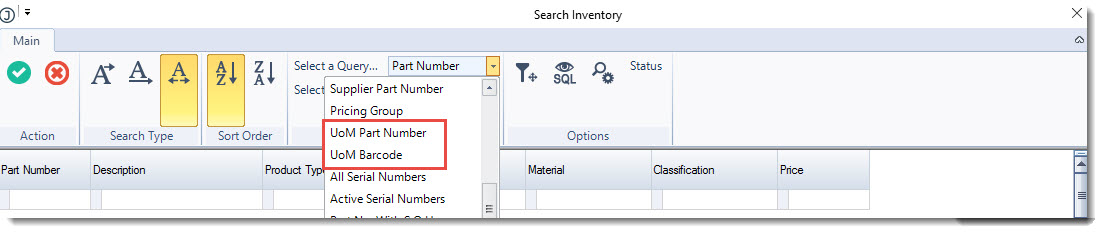
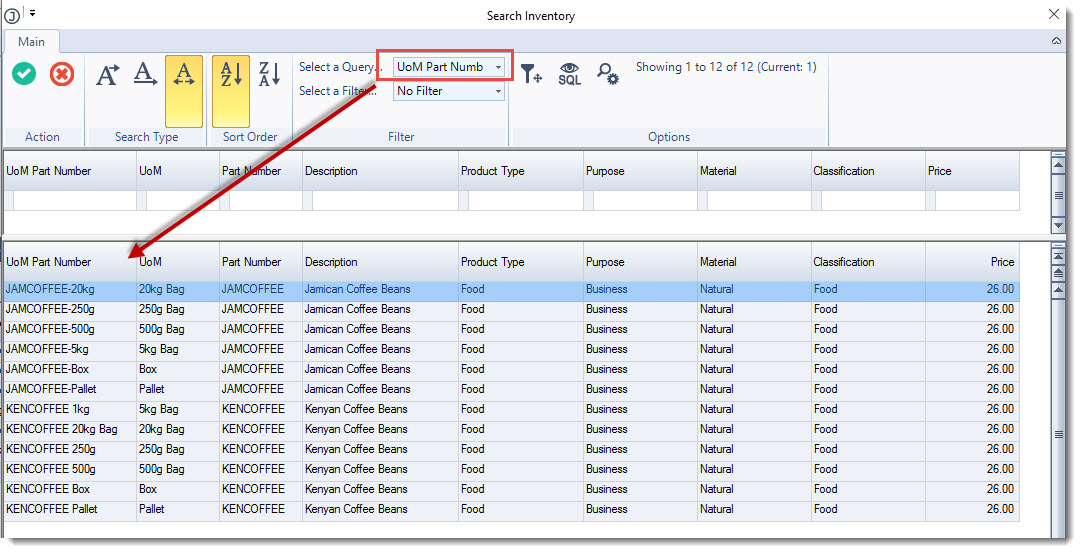
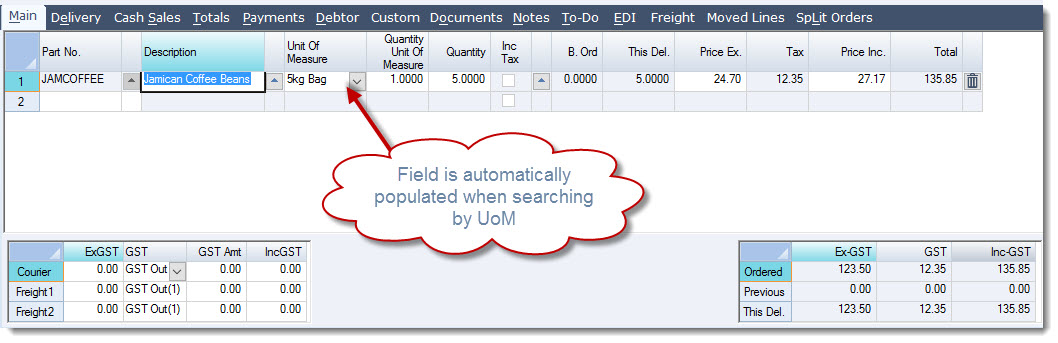
When using a UoM search option the Unit of Measure field on the order is automatically populated.