
Inventory classifications are used to group inventory items in Jiwa and apply key default settings.
This article explains how to create inventory classifications and how they are used when setting up inventory items. In Jiwa, inventory classifications are used to assign default General Ledger control accounts, default GST codes, and a default product price group.
Inventory classifications are also used for reporting, searching, and analysis. Many standard Jiwa inventory reports allow data to be filtered or grouped by inventory classification, so it is important to consider reporting requirements when creating or maintaining classifications.
Creating Inventory Classifications
From the menu select Inventory | Configuration | Classifications

From the menu ribbon select New
Alternatively, you can base your new classification on an existing one, load the required classification and select Copy from the menu ribbon.
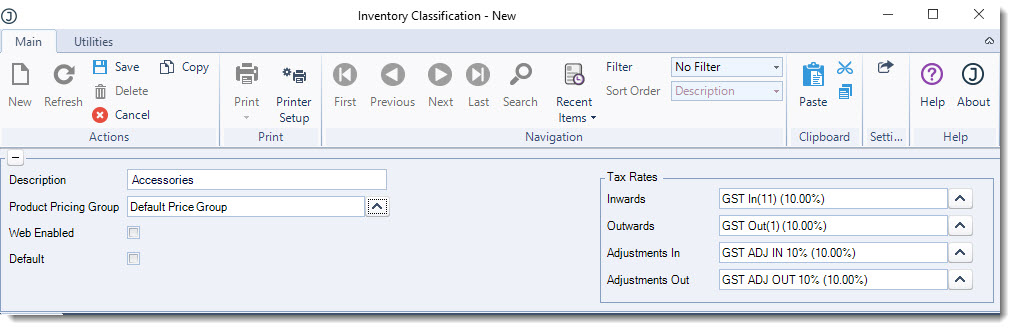
When copying an existing classification all ledger account settings are also copied. In the header section enter in the classification
-
Description,
-
Default product pricing group, and
-
Tax rates
|
Field |
Description |
|
Description |
Classification description |
|
Product Pricing Group |
This is the default product pricing group that is assigned to an inventory item on the Prices tab in inventory maintenance when the item is linked to this classification. The product price group can be changed on individual items if required. 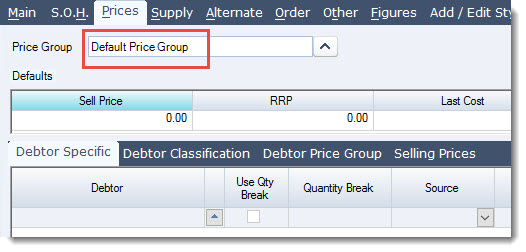
Note: Changing the product pricing group on a classification will not update existing inventory records. |
|
Web Enabled |
This flag is used to indicate that inventory items in this classifications are visible through a web based applicable. This is the default setting for items in this classification but can be changed on individual items if required. Note: Changing the web enabled flag on a classification will not update existing inventory records. |
|
Default |
This flag indicates if the classification is the default classification. Only 1 classification can be set as the default and is the classification that is automatically assigned to new items created through inventory maintenance. |
|
Tax Rates |
These are the default tax rates for items linked to this classifications but can be changed on individual items if required. Note: Changing the tax rates on a classification will not update existing inventory records. |
Ledgers Tab
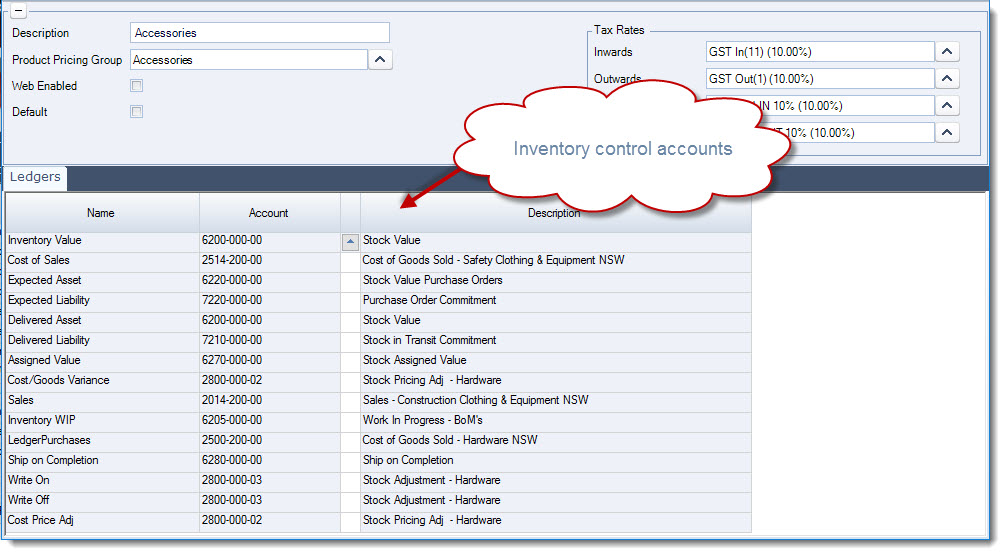
These are the default General Ledger control accounts for the classifications which are then applied to each inventory item linked to the classification.
These ledger accounts can be changed on an individual item if required in inventory maintenance under the Other | Ledgers tab.
The purpose of each account is explained in the table below, however if you are not sure on which accounts to set please contact your Accountant.
Note: Changing ledger accounts against an inventory classification will not update existing inventory records.
|
Control Account |
Description |
|
Inventory Value |
Inventory Asset Value For physical items this is the account that represents your stock on hand value in the Balance Sheet |
|
Cost of Sales |
Cost of Goods Sold This is the cost of sales expense account that invoices and credit notes post to. From Jiwa version 7.0.175 this account is used by non-physical items prior to this version the Inventory Value control account was used. |
|
Expected Asset |
Inventory Value on Purchase Orders This is the Balance Sheet asset account that is posted to when the purchase order status is set to SENT. It represents the value of stock on that purchase orders. This entry is reversed when stock is receipted in via GRN and shipment book-ins. These entries are also reversed out if the purchase order is cancelled. If the potential asset and liability is not to be taken up in the Balance Sheet then the Expected Asset and Liability control accounts can be set to the same account. |
|
Expected Liability |
Purchase Order Commitment This is the Balance Sheet liability account that is posted to when the purchase order status is set to SENT, this is the opposite entry to the Expected Asset account entry, and it represents the purchase order liability. This entry is reversed when stock is receipted in via GRN and shipment book-ins. These entries are also reversed out if the purchase order is cancelled. If the potential asset and liability is not to be taken up in the Balance Sheet then the Expected Asset and Liability control accounts can be set to the same account. |
|
Delivered Asset |
Inventory Value Received but Not Invoiced This is the Balance Sheet asset account that is posted to from GRN (excl. GST) and shipment book-ins when activated. This entry is reversed when the purchase invoice and shipment invoices are activated. If you do not require a separate account for the value of your inventory received but not invoiced then this control account can be set to your Inventory Value account. |
|
Delivered Liability |
Creditor Stock Purchase Accrual This is the Balance Sheet liability account posted to from GRN (excl. GST) and shipment book-ins when activated and is the opposite entry to the Delivered Asset account posting. This account represents the creditor stock value for stock that has been received but the creditors invoice is yet to be raised/activated. In other words it is the accrual account for the creditors invoice. When the creditors invoice is activated through purchase invoices and shipment invoices the liability is then transferred to Trade Creditors and if applicable GST is taken up. |
|
Assigned Value |
Inventory Delivered to Customers but not Invoiced This is the Balance Sheet asset account that is posted to when Bill Complete sales orders are processed and stock has been delivered to the customer but not yet invoiced. The entries are reversed when the sales order is invoiced. If you do not use Bill Complete sales orders this account should still be set as you will not be able to save your classification if the account is left blank. |
|
Cost/Goods Variance |
Price Adjustments on Stock Sold This is the expense account that is posted to when there are price changes in purchase invoices and shipment invoices and the stock has either been sold or adjusted out and no longer exists. |
|
Sales |
Sales This is the income account posted to when the item is sold. |
|
Inventory WIP |
Manufacturing Work in Progress This is the Balance Sheet WIP account that is posted to by processed work orders where stock is allocated to work in progress. If you do not use the manufacturing module this account should still be set as you will not be able to save your classification if the account is left blank. |
|
Ledger Purchases |
Supplier Inventory Purchases This is the expense account used when the system setting UseCostOfGoodsLedger is disabled and the UseInventoryPurchasesLedger is enabled. It is recommended that this account is set to the Cost of Sales account. This is a rarely used option which should be discussed with your Jiwa Consultant before implementation. |
|
Ship on Completion |
Inventory Allocated to Ship on Complete Sales Orders This is the Balance Sheet asset account that is posted to when stock is allocated to a Ship Complete sales order which has back orders. Processing the order transfers the value of the allocated stock to this account. The entries are reversed from this account when the sales order is invoiced. If you do not use Ship on Complete sales orders this account should still be set as you will not be able to save your classification if the account is left blank. |
|
Write On |
Inventory Adjustments In This is the expense account that is posted to by stock transfers and stock takes where stock is adjusted in increasing the stock on hand value |
|
Write Off |
Inventory Adjustments Out This is the expense account that is posted to by stock transfers and stock takes where stock is adjusted out decreasing the stock on hand value |
|
Cost Price Adj |
Inventory Cost Price Adjustments This is the expense account that is posted to by the Cost Price Update form where stock is revalued. |