
Manual Backorder Release is used when users need to control which backorders are fulfilled when stock becomes available.
This article explains how to release backorders using the Manual Backorder Release function in Jiwa. This function can be used for sales orders with a backorder mode of either Automatic or Manual, and allows users to choose which backordered quantities are released.
When using Manual Backorder Release, backorder priorities are ignored. This means users manually decide which backorders are released, rather than Jiwa releasing stock based on the normal backorder priority sequence.
This process can be used for processed Invoice or Active Orders, as well as unprocessed Active Orders.
Manual Backorder Release
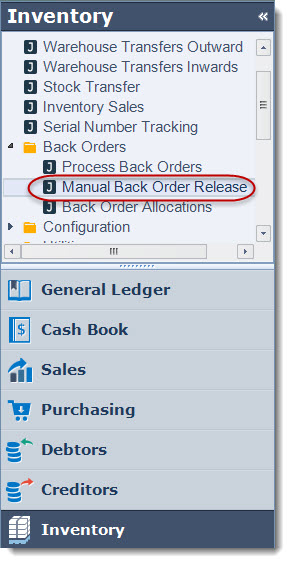
From the Inventory menu select Back Orders | Manual Back Order Release
From the menu select New to create a new batch

Set your range parameters as required then press GO

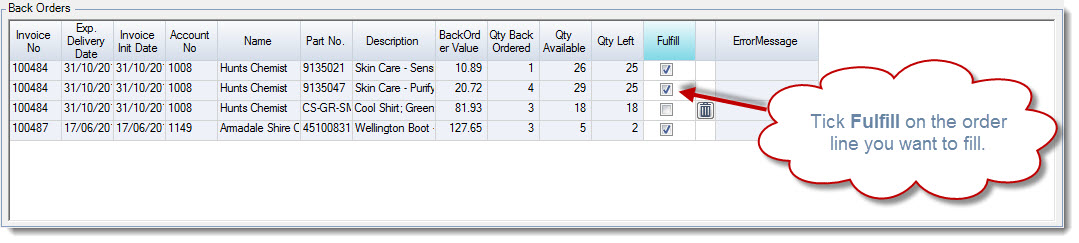
Back order lines on all orders that need the ranges set are populated into the Back Order grid.
Select the lines you want to fulfil by ticking the Fulfill check box.
Select the rubbish bin icon to remove unwanted lines from the grid
Once you have completed your back order selection in the reports section select which reports you want to print.
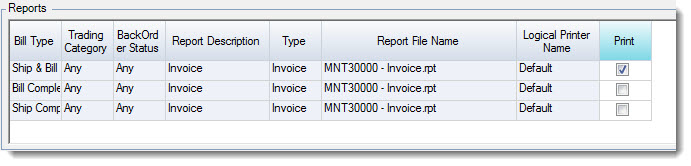
When you have selected your reports and have completed your backorder allocations select Save to fulfil the back orders.
Once your back orders have been fulfilled a new snapshot is created against the respective sales orders and these orders can be processed.