
Landed Cost processing in Jiwa create General Ledger journal entries as shipments are booked in, shipment costs are recorded, and the shipment is finalised.
This article explains the journal entries created during the landed cost process when the Use Cost of Goods Ledger system setting is enabled. This setting is commonly enabled in new Jiwa databases and affects how inventory and purchase-related costs are posted to the General Ledger.
The journal entries created may differ depending on your Jiwa configuration, the type of item being purchased, the shipment costs entered, and how those costs are apportioned. We recommend reviewing the article Physical Item v Non-Physical Item alongside this article so that you understand how item type can affect the accounting treatment.
Note
The examples in this article assume that the Use Cost of Goods Ledger system setting is enabled. If this setting is not enabled in your Jiwa database, or if your landed cost configuration differs, the journal entries created may be different.
Shipments
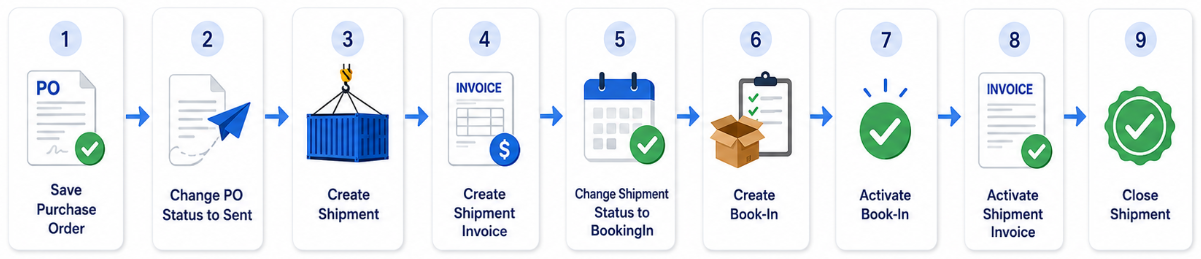
General Ledger Journals Created
The key difference in the journal sets created between local purchases and shipments is that import costs added to a shipment are accrued in the Import Cost Clearing account.
When the creditors invoice is then created the costs is transferred from the Import Cost Clearing account to Trade Creditors and GST taken up if applicable.
|
Step |
DR/CR |
Account |
Description |
|
|---|---|---|---|---|
|
1 |
Save Purchase Order |
N/a |
|
This step does not generate any journal entries. |
|
2 |
Change PO Status to Sent |
DR CR |
Expected Asset Value Expected Liability Value |
The expected ordered stock and liability value excluding GST are taken up in the Balance Sheet. If you do not want to see this the value of outstanding purchase orders in the Balance Sheet these control accounts can be set to the Stock on Hand account |
|
3 |
Create Shipment |
N/a |
|
Creating a shipment does not update the stock ledger or the General ledger. |
|
4 |
Add Shipment invoices |
N/a |
|
Adding freight forwarder invoices to the shipment does not update the Creditors or General ledgers. |
|
5 |
Change Shipment Status to Booking In |
N/a |
|
Changing the shipment status to Booking In does not increase your stock quantity or post any journals to the General Ledger |
|
6 |
Create Book-in |
N/a |
|
|
|
7 |
Activate Book-in |
DR CR DR CR CR |
Expected Liability Value Expected Asset Value Delivered Asset Value Delivered Liability Value Import Cost Clearing
|
When stock is received the accrual value of the quantity received on the purchase order is reversed from the Expected asset/liability accounts. The stock ledger is updated with the quantity received at the landed cost value on the Book-in. The asset value in the Balance Sheet is increased The supplier cost is accrued in the delivered liability account, and The freight forwarder costs are accrued in the import cost clearing account. |
|
8 |
Invoice Supplier and freight forwarder invoices |
DR CR DR DR DR CR |
Delivered Liability Value Delivered Asset Value Inventory Value Import Cost Clearing GST Paid Trade Creditors |
When the supplier and freight forwarder invoices are Invoiced on the shipment the delivered liability and asset values are reversed. The inventory value is updated with the landed cost value. The Creditors ledger is updated with the supplier and freight forwarder invoices including GST if applicable. The accrued values in the import cost clearing account are reversed. |
|
9 |
Close Shipment |
N/a |
|
This step does not generate any journal entries. |