
General Ledger account structure controls how accounts are organised in Jiwa. It determines how account numbers are segmented, how parent and posting accounts are created, and how financial information is grouped for reporting.
This article explains the key concepts behind General Ledger account structure in Jiwa, including account segments, parent accounts, posting accounts, and control accounts. Understanding these concepts is important before creating new General Ledger accounts, as changes to the account structure can affect posting, reporting, and sub-ledger integration.
Account segments
General Ledger account codes in Jiwa can be set up using multiple segments. These segments allow the chart of accounts to support simple or more detailed reporting structures.
For example, a simple account structure may only use an account number and sub account. A more detailed structure may include account number, branch, division, department, or other reporting segments.
The account structure used in your Jiwa database is normally determined during implementation and should reflect the way the business needs to report and analyse financial information.
Parent and posting accounts
Jiwa uses two main types of General Ledger accounts: parent accounts and posting accounts.
|
Account type |
Purpose |
|---|---|
|
Parent account |
A read-only account used to consolidate the balances of accounts below it. Users cannot post transactions directly to a parent account. |
|
Posting account |
An account that can be used for transactions and journal postings. |
Parent accounts are used for reporting and consolidation. Posting accounts are used for transaction entry.
How parent accounts are created
Jiwa can automatically create or update parent accounts when posting accounts are created within a segmented account structure.
For example, if an existing posting account is later used as the top level of a more detailed account structure, Jiwa may convert that account to a parent account so that new child posting accounts can sit beneath it.
Example
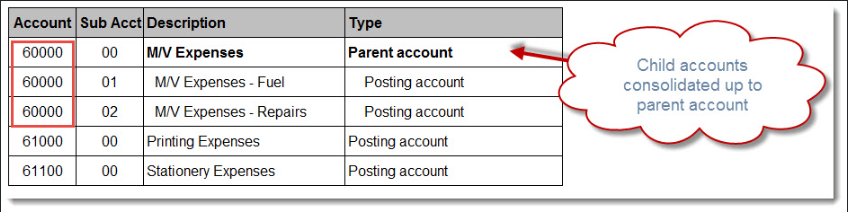
|
Account |
Account type |
Purpose |
|---|---|---|
|
60000-00 |
Parent account |
Consolidates all Motor Vehicle Expense accounts. |
|
60000-01 |
Posting account |
Motor Vehicle Expenses — Registration. |
|
60000-02 |
Posting account |
Motor Vehicle Expenses — Fuel. |
|
60000-03 |
Posting account |
Motor Vehicle Expenses — Repairs. |
In this example, users post transactions to the detailed posting accounts. The parent account is used to report the consolidated total.
Multi-segment account structures
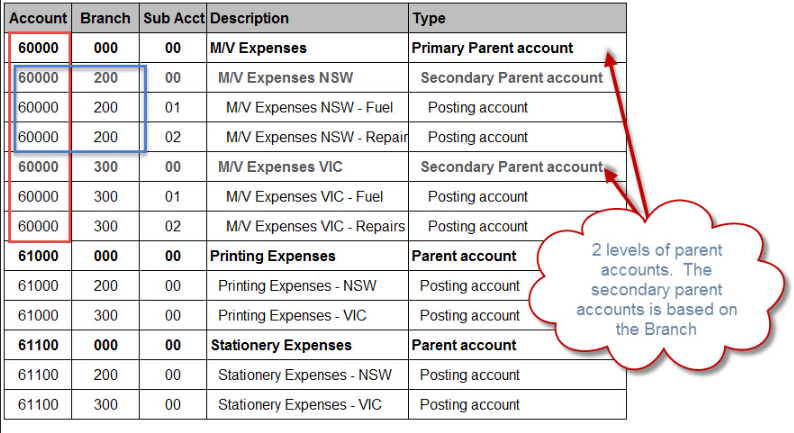
Where more than one segment is used, Jiwa may create multiple levels of parent accounts.
For example, an account structure may include:
Account – Branch – Sub Account
This allows reporting at different levels, such as:
|
Level |
Example |
Purpose |
|---|---|---|
|
Primary parent |
60000 |
Consolidates all accounts under the main account number. |
|
Secondary parent |
60000-100 |
Consolidates all sub accounts for a specific branch. |
|
Posting account |
60000-100-01 |
Used for transaction posting. |
The more segments used in the account structure, the more parent account levels may be created by Jiwa.
Control accounts
Control accounts are General Ledger accounts used by Jiwa sub-ledgers, such as Debtors, Creditors, and Inventory, to post transactions to the General Ledger.
Control accounts are commonly maintained through module classifications but can be overridden at a specific product, Debtor or Creditor level. These classifications tell Jiwa which General Ledger accounts should be used when transactions are created in the related module.
Control accounts are important because they connect operational transactions to the General Ledger.
Important note about control accounts
Control accounts should remain posting accounts. They should notbe converted into parent accounts by adding child accounts beneath them.
Converting a control account into a parent account will result in errors as transactions cannot be posted to parent account.
Changing chart of account structure
If you need to change your chart of account structure please call Opal Logic on 1300 456 725 or send an email to support@opallogic.com.au
Before creating new General Ledger accounts
Before creating new General Ledger accounts, consider:
|
Question |
Why it matters |
|---|---|
|
Where should the account sit in the ledger? |
Determines whether the account belongs in the Profit and Loss or Balance Sheet section. |
|
What type of account is required? |
Helps determine whether the account is an asset, liability, income, expense, equity, or other account type. |
|
What account number and segment structure should be used? |
Ensures the account fits correctly within the existing chart of accounts. |
|
Will the account be used as a control account? |
Control accounts require extra care because they are used by Jiwa sub-ledgers. |
|
Is a posting account or parent account required? |
Users can only post to posting accounts. Parent accounts are used for consolidation and reporting. |
Key points to remember
-
General Ledger account structure controls how accounts are organised and reported in Jiwa.
-
Posting accounts are used for transactions. Parent accounts are used for consolidation and reporting.
-
Jiwa may automatically create or update parent accounts when posting accounts are created in a segmented account structure.
-
Control accounts connect Jiwa sub-ledgers, such as Debtors, Creditors, and Inventory, to the General Ledger.
-
Control accounts should not be converted into parent accounts.