
BAS reports are used in Jiwa to review GST-related transaction values for a selected reporting period.
This article explains how to run BAS reports in Jiwa and review the reported values. These reports help users check GST collected, GST paid, and other BAS-related amounts before preparing or reconciling Business Activity Statement figures.
Before running BAS reports, it is important to understand how BAS codes are used in Jiwa, as the reports rely on the BAS codes assigned to transaction lines.
BAS Reporting
Before finalising your BAS in Jiwa it is recommended that the reporting period is finalised and a 'Global Lock' has been enabled.
Reviewing BAS Worksheets
Before producing any BAS return it is highly recommended that a review of the BAS worksheets is undertaken to ensure that transactions have been assigned the correct BAS code. These reports also substantiate your BAS return.
The worksheet reports can be run during the course of the BAS period to check to ensure transactions are correct and corrections made as required, thus eliminating the necessity for a major review when your BAS is due.
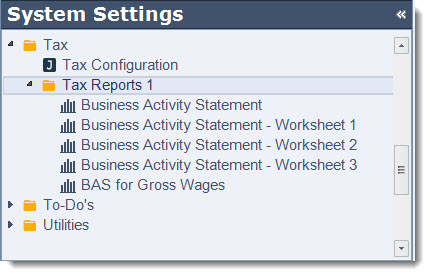
There are 3 different worksheets in Jiwa each reporting different transaction types
|
Report |
Description |
|
BAS - Worksheet 1 |
Displays all transaction relating to sales (supplies) and purchases (acquisitions) primary grouping by BAS code. Each transaction is split based on tax rate applied to each line and the GST amount applicable to the transaction is shown on a separate line. |
|
BAS - Worksheet 2 |
Displays all transactions relating to salaries and wages |
|
BAS - Worksheet 3 |
Displays a summary of transactions by General Ledger account, categorising the transactions in each account by BAS code. This report is useful in isolating problem transactions to specific account/(s). |
Business Activity Statement - Worksheet 1
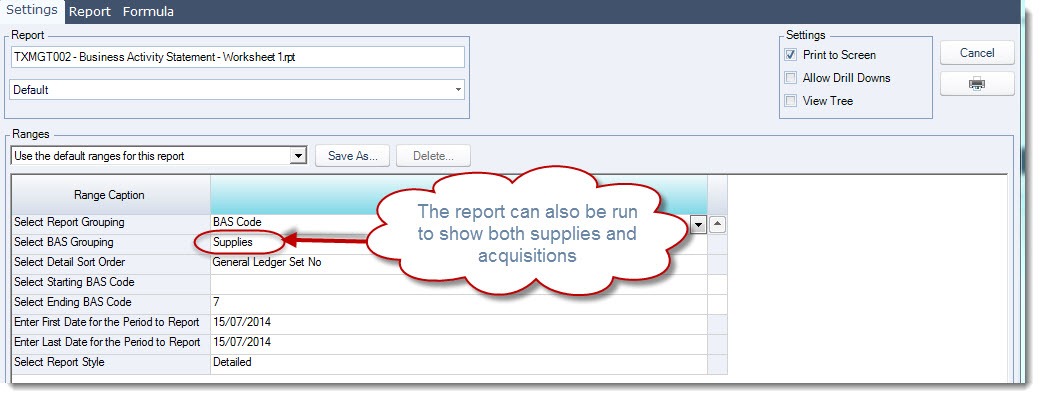
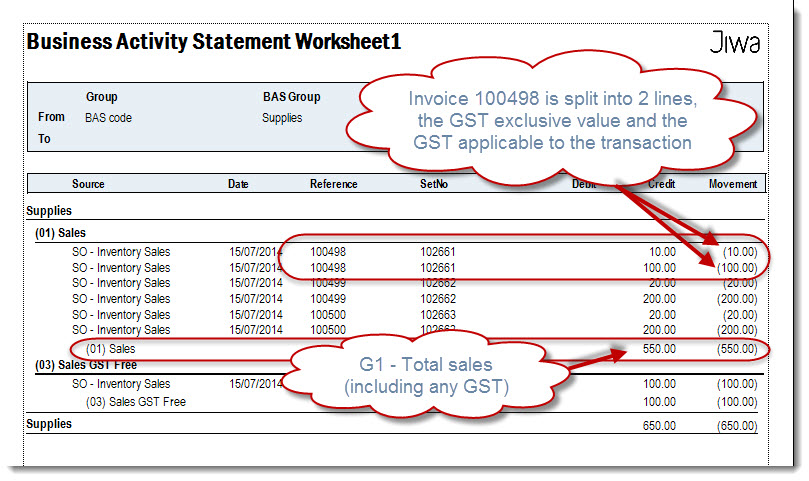
This report allows you to review your sale (supplies) and purchase (acquisition) transactions at the line level to ensure that the correct code has been applied when run in detail.
The report can return information in various ways depending on what ranges are set.
In the following example the report ranges are set as follows;
This report displays the GST exclusive value of the transaction and the GST component on a separate line.
The total for each BAS code feeds into your GST Calculation Worksheet for BAS from which your BAS return is populated.
Business Activity Statement - Worksheet 2
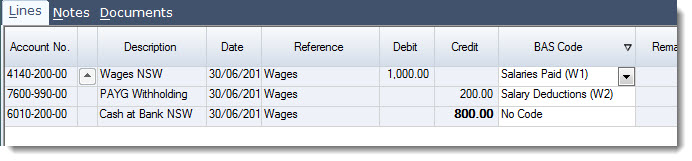
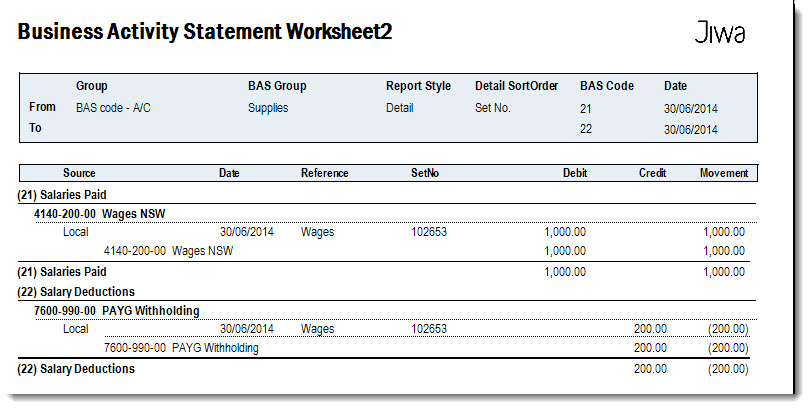
This report allows you to review your salary and wage transactions to ensure correct BAS codes have been applied.
This is only applicable when processing your payroll journal the relevant codes have been applied as per the example below.
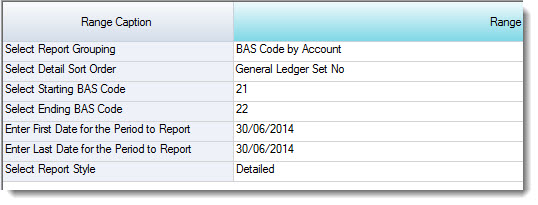
The report can return information in various ways depending on what ranges are set.
In the following example the report ranges are set as follows;
Producing your BAS Report
There are 2 types of BAS returns that can be produced in Jiwa, which to use is dependant up on how you record your salaries and wages in Jiwa.
|
BAS Report |
Description |
|
Business Activity Statement |
Used when NET wages are expensed to the Profit & Loss |
|
BAS For Gross Wages |
Used when GROSS wages are expensed to the Profit & Loss |