Note types are used in Jiwa to categorise notes recorded against supported forms and records.
This article explains how to create and maintain note types in Jiwa. Using clearly defined note types helps users record information consistently and can make notes easier to sort, review, and report on.
Note types are maintained separately for each Jiwa module, so only the types relevant to that module need to be created. Each Jiwa database includes at least one default note type.
Note Types
Note types are also maintained in the Configuration section of each module.
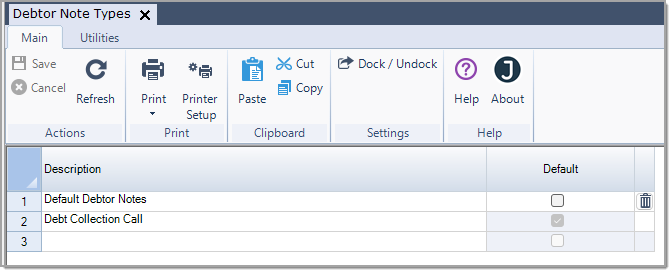
In this example we look at maintaining our Debtor Note Types
From menu select Debtors < Configuration < Document Types
Add your new Note Type description to the new available line
Use the Default flag to set your default Note type
From the menu ribbon select Save. Continue adding your required types.
Note types can be renamed in this form, any name change will flow through to all notes linked to the type.
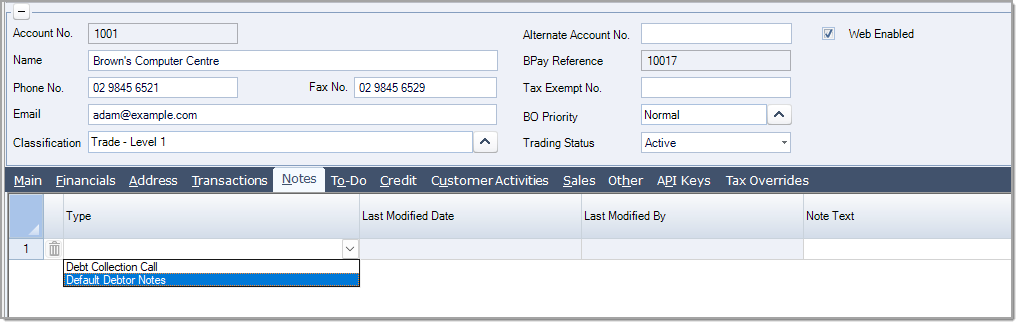
In Debtor Maintenance the new document type is available for selection.
Note: If you are in the Debtor Maintenance form you will need to close and re-open the form for the change to take effect.