
This check list has been designed to assist you with your end of month process in Jiwa and should be modified to meet with your specific requirements and business processes.
Because transactions in Jiwa can be future dated the monthly roll-over process is more about recalculating your aged balances and re-aging your Debtor and Creditor transactions, rather than opening a new period or locking off an old period.
It is recommended that any future dated payments are not allocated to transactions as the ageing process closes off fully allocated transactions irrespective of which period they are in so your current period allocated transactions will be aged.
Debtors Ledger
|
|
Task
|
Due By
|
Completed
|
|
1. |
Ensure all Debtor invoices for the period have been processed |
EOM + 1 Day |
|
|
2. |
Ensure all Debtor payments for the period have been processed and activated |
EOM + 1 Day |
|
|
3. |
Print and/or save to PDF the Debtors Balance As At report Debtors | Reports | Debtors Balance As At 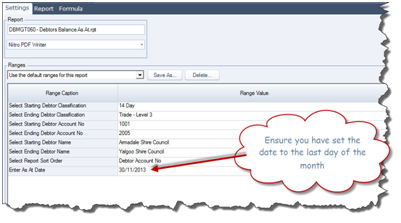
Saving the Debtors Aged Balance report at the time the ledger has been reconciled allows you to quickly identify any variances should transactions be posted back into the period after your debtor statements have been run. |
EOM + 1 Day |
|
|
4. |
Print and/or email your Debtor statements Debtors | Statements If printing statements select the order you want your statements printed in. 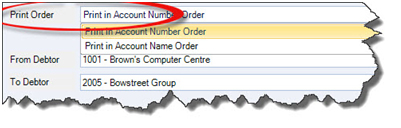
Enter in the date you want the statements printed as at 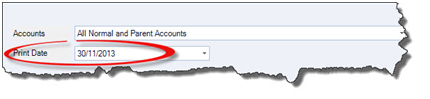
Set your Options ensure that you use the Debtors Statements As At report as this will only pickup transactions up to and including the Print Date selected 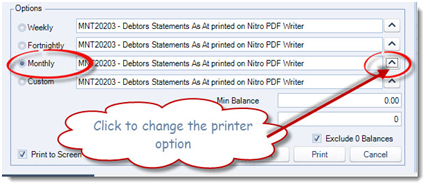
|
EOM + 1 Day |
|
|
5. |
Print and/or save to PDF the Debtors Reconciliation report to ensure that you Debtors ledger reconciles to the General Ledger. Debtors | Reports | Debtors Reconciliation For a reconciliation of the movement for the period the Debtors and General Ledger Reconciliation report can be run. Debtors | Reports | DB GL Reconciliation |
EOM + 1 Day |
|
|
|
The aging process ages balances by one period based on the period type selected and more importantly ages out all fully allocated transactions. What this means is that transactions once aged are permanently locked from the de-allocation process in the future. If you do need to de-allocate an aged out transaction please contact your Jiwa Consultant. If you are using the Debtor Statement As At report then statements can be produced before or after the roll over process. However, if you are using an older statement type it is recommended that Debtor Statements are produced before the roll over process is run. If you are unsure contact your Jiwa Consultant. |
|
|
|
|
Note: The roll-over process must be completed in the new period.
For example if you have completed your month end run for November this process must be completed during December. |
|
|
|
6. |
Roll-over your Debtors Ledger System | Roll-Over | Period Roll-Over Select the Period Type to roll-over Only select Don't Age Transactions if you do not want to age out your allocated transactions Note: If you do opt to age out your transactions any current period allocated transactions will also be aged out. If you are unsure consult your Jiwa consultant. 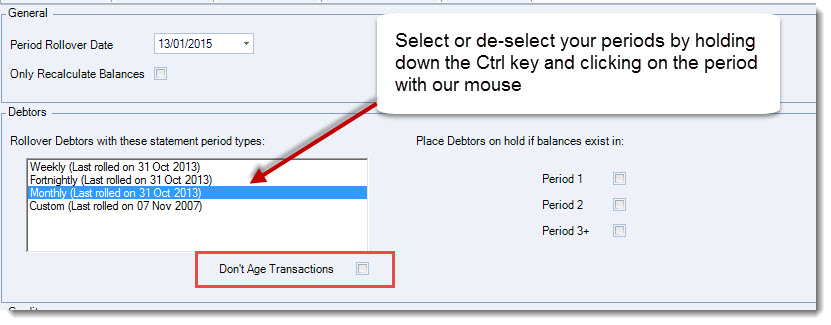
From the menu ribbon select Process to complete your roll-over. |
EOM + 1 Day |
|
Stock Ledger
There is no roll-over process for the stock ledger however it is critical that the Stock Valuation report is produced at the close of the period before transactions are activated for the new period. The reason for this is that;
-
The Stock on Hand report cannot be run retrospectively
-
This report substantiates the stock value in the Balance Sheet
|
|
Task
|
Due By
|
Completed
|
|
1. |
Ensure that all stock related transactions that need to be activated for the period you are closing have been activated to ensure reporting accuracy |
EOM + 1 Day |
|
|
2. |
Print and/or save to PDF the Stock on Hand with Allocations report Inventory | Reports | Stock on Hand with Allocations |
EOM + 1 Day |
|
|
3. |
Print and/or save to PDF the Inventory Control report Inventory | Reports | Inventory Control |
EOM + 1 Day |
|
|
4. |
Print and/or save to PDF the Outstanding Purchase Orders report Purchasing | Reports | Outstanding Purchase Orders If purchase orders are included in the Balance Sheet this report can be used to validate the value. This report cannot be run retrospectively so should be run when prior to transactions being processed in the new period |
EOM + 1 Day |
|
|
5. |
Print and/or save to PDF the Back Orders and Outstanding Orders report Sales | Reports | BackOrders and Outstanding Orders (Select Product Status = All Unprocessed) This report will substantiate the unprocessed sales order values on the inventory control report. This is a report that cannot be run retrospectively |
EOM + 1 Day |
|
Creditors Ledger
The Creditors Ledger can be rolled a week or 2 after your end of period so that all creditor invoices can be taken up.
|
|
Task
|
Due By
|
Completed
|
|
1. |
Ensure all Creditor invoices for the period have been processed and activated |
EOM + 5 Days |
|
|
2. |
Ensure all Creditor payments for the period have been processed and activated |
EOM + 5 Days |
|
|
3. |
Print and/or save to PDF the Creditors Balance As At report Creditors | Reports | Creditors Balance As At |
EOM + 5 Days |
|
|
4. |
Print and/or save to PDF the Creditors Reconciliation report to ensure that you Debtors ledger reconciles to the General Ledger. Creditors | Reports | Creditors Reconciliation For a reconciliation of the movement for the period the Creditors and General Ledger Reconciliation report can be run. Creditors | Reports | CR GL Reconciliation |
EOM + 5 Days |
|
|
5. |
System | Roll-Over | Period Roll-Over Select the Period Type to roll-over Only select Don't Age Transactions if you do not want to age out your allocated transactions Note: If you do opt to age out your transactions any current period allocated transactions will also be aged out. If you are unsure consult your Jiwa consultant. From the menu ribbon select Process to complete your roll-over. |
EOM + 5 Days |
|
|
6. |
Lock the sub ledgers from any further postings to the period closed. General Ledger | Configuration | Setup Change the Locked status to External Lock this will lock the Debtors, Creditors and Stock ledgers but still allow you to post to the General Ledger 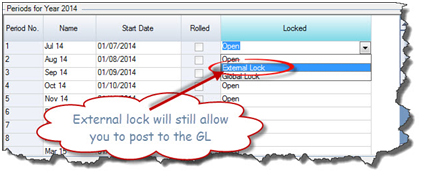
|
EOM + 5 Days |
|
General Ledger
|
|
Task
|
Due By
|
Completed
|
|
1 |
Complete all bank reconciliations |
EOM + 6 Days |
|
|
2. |
Reconcile your Stock Delivered Liability Account (Stock in Transit Commitment) This account is holds the value of stock that has been received into Jiwa however the creditor invoice remains outstanding. Use the Receival Slips Uninvoiced report to validate the balance in this account. Purchasing | Reports | Receival Slips Uninvoiced |
EOM + 6 Days |
|
|
3. |
Reconcile all other clearing accounts |
EOM + 6 Days |
|
|
4. |
Review your Profit & Loss Report/(s) |
EOM + 6 Days |
|
|
5. |
Review your Balance Sheet |
EOM + 6 Days |
|
|
6. |
LOCK THE PERIOD FROM ALL POSTINGS Lock the sub ledgers from any further postings to the period closed. General Ledger | Configuration | Setup Change the Locked status to Global Lock this will the period from any further postings |
EOM + 6 Days |
|