
In this article we look at how to create Creditor classifications in Jiwa 7.
Creditor Classifications
In Jiwa Creditor classifications serve several purposes, they assign to new Creditors the default;
-
Purchase Order Workflow,
-
Trading Terms, and
-
General Ledger control accounts
In addition to this they are also used for reporting and searching purposes.
Many of the standard Jiwa Creditor reports use Creditor classifications to filter or group data, so when creating Creditor classifications consideration should also be given to your reporting requirements.
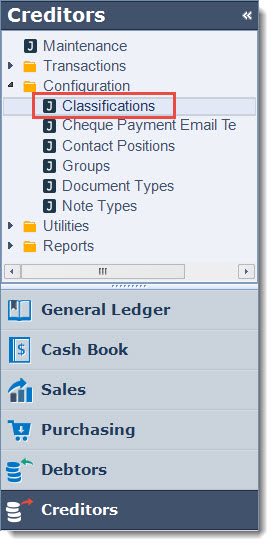
From the menu select Creditors | Configuration | Classifications
From the menu ribbon select New
Alternatively, you can base your new classification on an existing one, load the required classification and select Copy from the menu ribbon.
When coping an existing classification all ledger account settings are also copied.
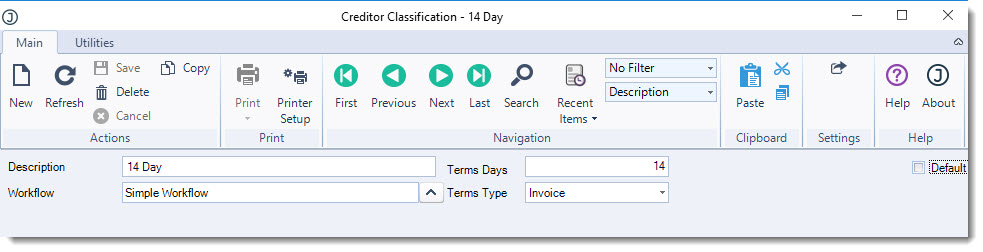
In the header section enter in the classification details;
-
Description,
-
Default purchase order workflow, and
-
Default trading terms
|
Field |
Description |
|
Description |
Classification description |
|
Workflow |
This is the default purchase order workflow that is assigned to the Creditor account on the Credit tab under Purchase Order Settings in Creditor maintenance when the account is linked to this classification.
The Workflow can be changed on individual Creditor accounts if required. 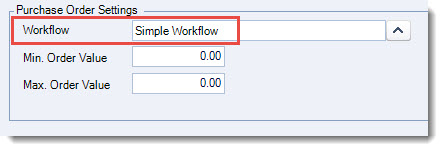
Note: Changing the default Workflow on a classification will not update existing Creditor records. |
|
Terms Days / Terms Type |
These are the default trading terms that are assigned to a Creditor account on the Credit tab in Creditor maintenance when the account is linked to this classification.
Trading terms can be changed on individual Creditor accounts if required. 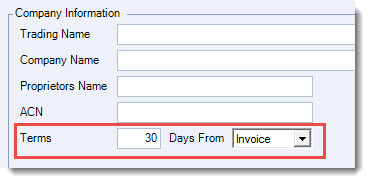
Note: Changing the trading terms on a classification will not update existing Creditor records. |
|
Default |
This flag indicates if the classification is the default classification. Only 1 classification can be set as the default and is the classification that is automatically assigned to new accounts that are created through Creditor maintenance. |
Ledgers
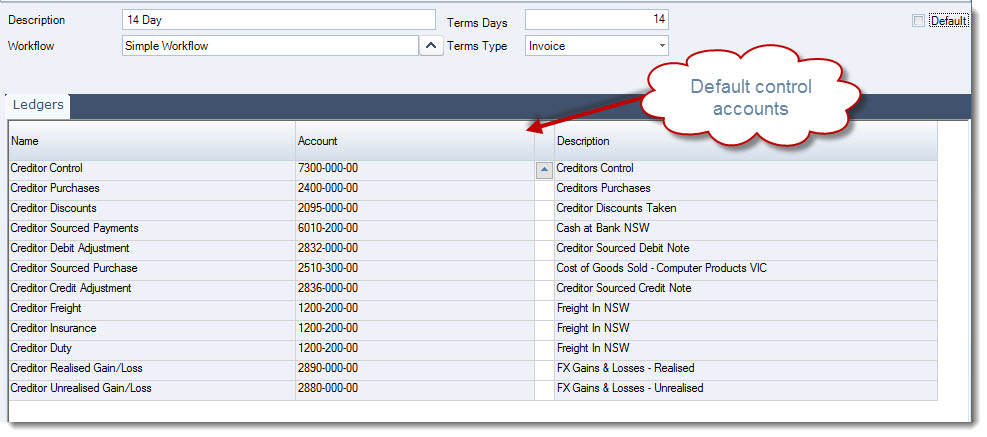
These are the default General Ledger control accounts for the classification which are then applied to each Creditor account linked to the classification.
These ledger accounts can be changed on individual accounts if required in Creditor maintenance under the Financials | Ledger Accounts tab.
The purpose of each account is explained in the table below, however if you are not sure on which accounts to use contact your Jiwa Consultant.
Note: Changing ledger accounts against a Creditor classification will not update existing Creditor records.
|
Control Account |
Description |
|
Creditors Control |
This control account should be linked to your Creditors control account in the Balance Sheet. |
|
Creditor Purchases |
This control account is only used when your Jiwa database is set to not use inventory cost of sales or the inventory purchases ledger. Note: This is a rarely used option, please contact your Jiwa consultant if you are considering changing the configuration of your database. |
|
Creditor Discounts |
This is the control account that is used when discounts are applied through the;
|
|
Creditor Sourced Payments |
This control account is used by the EFT/Cheque Payment form. |
|
Creditor Debit Adjustments |
This control account is used by the Creditor Debit Adjustments form. This account is typically set to an expense account. |
|
Creditor Sourced Purchase |
This control account is used by the Creditor Purchases form when creating non stock invoices. |
|
Creditor Credit Adjustments |
This control account is used by the Creditor Credit Adjustments form. This account is typically set to an expense account. |
|
Creditor Freight |
This control account is used to post amounts entered in the Freight field on Purchase Invoices. 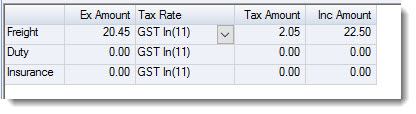
|
|
Creditor Insurance |
This control account is used to post amounts entered in the Insurance field on Purchase Invoices. |
|
Creditor Duty |
This control account is used to post amounts entered in the Duty field on Purchase Invoices. |
|
Creditor Realised Gain/Loss |
This control account is used when posting realised foreign exchange gains/loss. |
|
Creditor Unrealised Gain/Loss |
This control account is no longer used. |