
We’re currently updating our website to a new platform. We’re still operating as usual, but some pages may be under construction. Thank you for your patience.
Jiwa Training Centre

Upgrading Your Scanner Terminal

There will be occasions  when your scanner (terminal) ASPluris software needs to be upgraded.  Your Jiwa consultant will advise you when this is required.

This article takes you through the steps of upgrading your scanner (terminal) to the latest version.

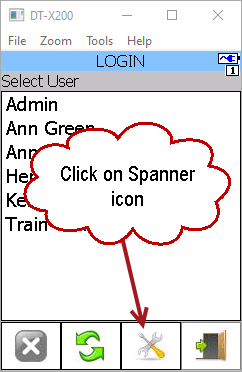
Start ASPluris on the scanner but do not log in

Click on the Settings (spanner) icon at the bottom of the screen
https://austlinkwebresources.s3.amazonaws.com/www.jiwatraining.com.au/articles/ASPluris-Upgrading-Your-Scanner/1.png


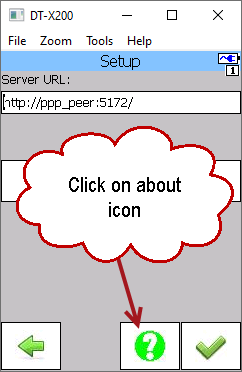
Then click on the About (question mark) icon.
https://austlinkwebresources.s3.amazonaws.com/www.jiwatraining.com.au/articles/ASPluris-Upgrading-Your-Scanner/2.png


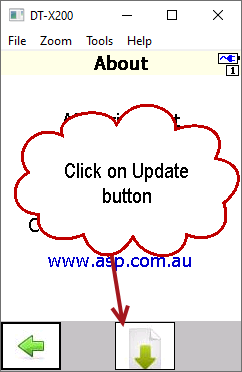
Click on the Update (down arrow) icon
https://austlinkwebresources.s3.amazonaws.com/www.jiwatraining.com.au/articles/ASPluris-Upgrading-Your-Scanner/3.png


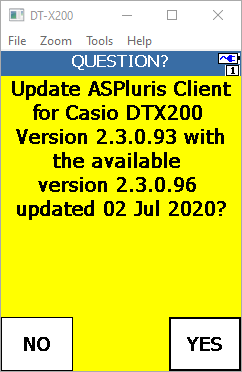
The next screen displays the current version you are on and the update that is available.

Click on Yes to start the upgrade process.
https://austlinkwebresources.s3.amazonaws.com/www.jiwatraining.com.au/articles/ASPluris-Upgrading-Your-Scanner/4.png
https://austlinkwebresources.s3.amazonaws.com/www.jiwatraining.com.au/articles/ASPluris-Upgrading-Your-Scanner/5.png


When the update has been completed you will be returned to the Login screen.

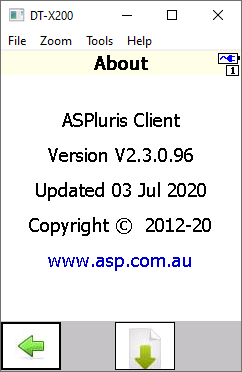
To check which version you are now on simply click on the Settings then About icons again.
https://austlinkwebresources.s3.amazonaws.com/www.jiwatraining.com.au/articles/ASPluris-Upgrading-Your-Scanner/6.png