
To-Do types are used in Jiwa to categorise tasks, reminders, and follow-up activities recorded against supported forms and records.
This article explains how to create and maintain To-Do types in Jiwa. Using consistent To-Do types helps users organise follow-up work, identify the purpose of a task, and sort or report on outstanding activities.
To-Do types are maintained separately for each Jiwa module, so only the types relevant to that module need to be created. Each Jiwa database includes at least one default To-Do type.
To-Do Types
To-Do types are unique to each function however unlike Document and Note types they are maintained in System Settings.
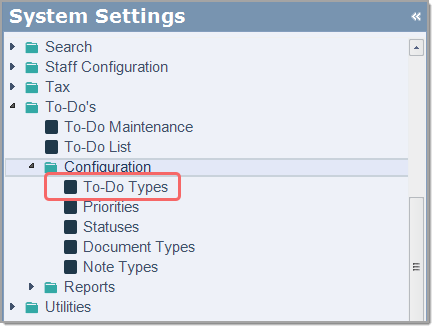
From menu select System Settings < To-Do's < Configuration < To-Do Types
Select the function or module that your To-Do type is applicable to
Add your new To-Do description to the next available line
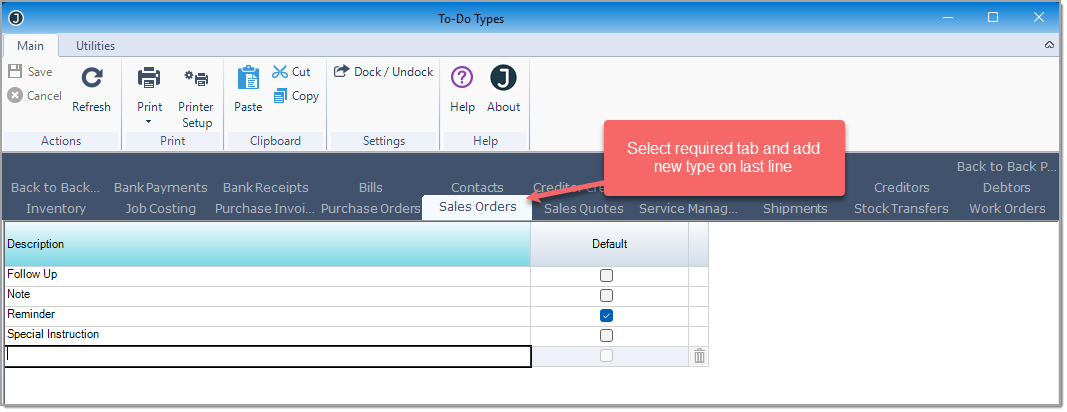
Use the Default flag to set your default To-Do type
From the menu ribbon select Save. Continue adding your required types.
When creating a new To-Do your new types are available.
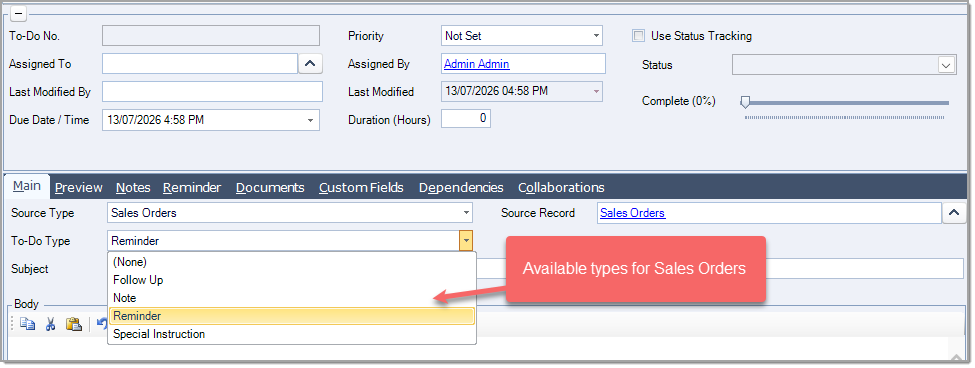
Note: If you are in the To-Do Maintenance form you will need to close the form and re-open for the change to take effect.
To-Do types can be renamed in this form, any name change will flow through to all To-Do's linked to the type.